
Remember what you read
Save notes and quotes from books, and Bloomind brings them back at the right time with spaced repetition. A few minutes a day is enough.


Why you forget what you read
You read the book. Where did it go? You finish a book you loved, highlight dozens of passages, and feel like you learned a lot. A month later, you can recall one or two ideas. The rest is gone.
It's not your memory. It's the forgetting curve: without review, we lose most new information within days. Rereading and highlighting feel productive, but they don't stop it. What does is coming back to an idea at the right moment and actively recalling it.
Read: How to remember what you read (7 techniques that actually work) →
See what you're forgetting. Then win it back.
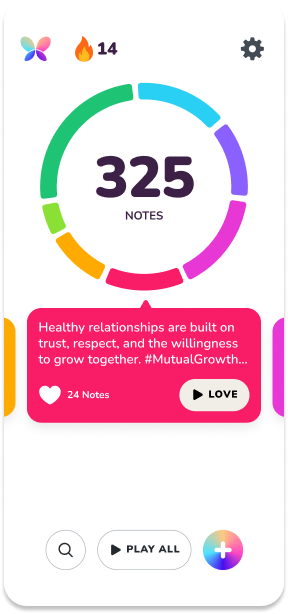
Most note apps only store what you save. Bloomind keeps track of what's fading from your memory, so you always know how many notes need your attention.
Track forgotten notes
Bloomind remembers when you last revisited each note and shows you how many of them you're forgetting, so you can see what's slipping away from the books you read.
Revisit them in Play mode
Open Play mode and the notes you haven't revisited in the longest time show up first. The ideas that are fading get your attention before the ones you saw recently.
How to remember your books with Bloomind
A simple routine that turns what you read into what you remember.
-
1
Save what matters
Write down ideas, quotes and lessons from the books you read, in your own words. Already have notes somewhere else? Import them from a CSV file.
-
2
See what you're forgetting
Bloomind tracks when you last revisited each note and shows you how many you're starting to forget, so you know when it's time to come back to them.
-
3
Play to remember
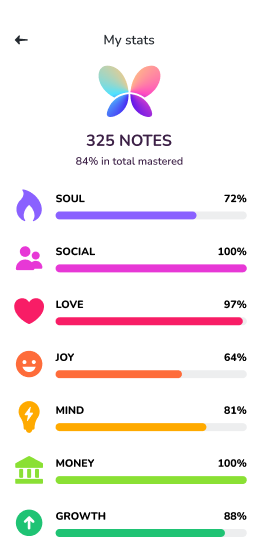
Open Play mode for a few minutes a day. The notes you haven't seen in the longest time come first, and as you revisit them you see your progress across the areas of your life you care about most.
Who Bloomind is for
Nonfiction readers
You read self-improvement, business, psychology or philosophy books because you want them to change how you think and act. Bloomind keeps their best ideas in front of you long after you close the book, so you can actually use them.
People with years of forgotten highlights
Your e-reader, notebooks and notes app are full of passages you never looked at again. Bring them into Bloomind with a CSV import and turn a dusty archive into ideas you review and remember.
A book notes app built for remembering
-
Forgotten notes tracker
Always know how many of your notes are fading and need a revisit.
-
Play mode
Short review sessions that start with the notes you haven't revisited in the longest time.
-
Mastery by life area
See how many notes you've mastered in each area of your life.
-
Life areas & hashtags
Organize notes by what they mean to you, not just which book they came from.
-
CSV import
Bring in the notes and quotes you've already collected.
-
Free on iOS & Android
No subscription. Download it and start with your next book.
Frequently asked questions
What is spaced repetition?
Spaced repetition is a learning technique where you revisit information spread out over time instead of all at once. Coming back to an idea after a gap, as it starts to fade, makes the memory stronger and longer lasting. Bloomind applies this to your book notes: it tracks when you last revisited each one and brings back the ones you haven't seen in the longest time first.
What is Play mode?
Play mode is where you revisit your notes. Bloomind keeps track of when you last revisited each note, and when you start Play mode, the ones you haven't seen in the longest time show up first. That way the ideas you're most likely forgetting get your attention before the rest.
Is Bloomind free?
Yes. Bloomind is free to download and use on iOS and Android. There is no subscription.
How is Bloomind different from highlighting in my e-reader?
Highlights are saved and then mostly forgotten, and nothing tells you that's happening. Bloomind shows you how many notes you're forgetting and brings them back in Play mode, so you actively recall each idea instead of letting it sit in a list you never open.
How is Bloomind different from Anki or other flashcard apps?
Flashcard apps are built for question-and-answer cards, like vocabulary or exam facts. Bloomind is built for ideas, quotes and lessons from books. You save a note in your own words and Bloomind keeps track of when you last saw it, with no cards to design and no schedules to manage.
Can I import notes I already have?
Yes. You can import existing notes and quotes into Bloomind from a CSV file.
How much time does it take each day?
A few minutes. Play mode starts with the notes you haven't revisited in the longest time, so even a short session covers the ideas you're most likely forgetting.
Start remembering what you read
Save your book notes and quotes, and let Bloomind bring them back at the right time. Free on iOS and Android.